
















Improve
Project Profitability

with Time Tracking

Starter Time & Billing
$3.99 /mo

per user billed annually

or $5.49 month-to-month

Start your free trial
  • Project templates

  • Edit profiles

Premium Profit & Productivity
$6.99 /mo

per user billed annually

or $9.99 month-to-month

Start your free trial
  • Unlimited subtasks

  • Budgeting alerts

  • Hide time and pages

  • Time rounding

Enterprise Management & Security
On Request

Book a demo to discuss your custom setup

Contact us
  • Data warehouse access

  • Custom reports

  • Excel & Power BI API templates

  • User directory sync

  • Data pipeline to BigQuery & more

  • Advanced customization

  • Admin enhancements

Free Easy & Free
$0

Free forever plan

Including:

  • Timesheets

  • Web, desktop & mobile apps

  • Unlimited projects

  • Unlimited users

  • 2-factor authentication

timecamp img
badge
badge
badge
badge
badge
badge
badge
badge
badge
badge

Tailor our best time tracking software to your team's needs with our experts

Set a demo in under a minute, then start for free.

Latest blog updates

See all articles

Frequently Asked Questions

Yes. TimeCamp offers a free forever plan for unlimited users that includes unlimited projects, timesheets, all apps, and, best of all, its new AI time tracking.

TimeCamp allows you to add unlimited users to a single account, ensuring your account scales with your business growth.

TimeCamp integrates with the most popular project management tools on the market, such as Asana, Trello, Clickup, Monday.com, Jira, Azure DevOps, Podio, Smartsheet, Wrike, and so on. With such a vast range of tools to integrate with and custom integrations on the board, TimeCamp promises that there’s no need to ditch your previous setup – TimeCamp surely adjusts to it.

Absolutely. TimeCamp meets the highest security and data privacy requirements and actively seeks new certification opportunities.

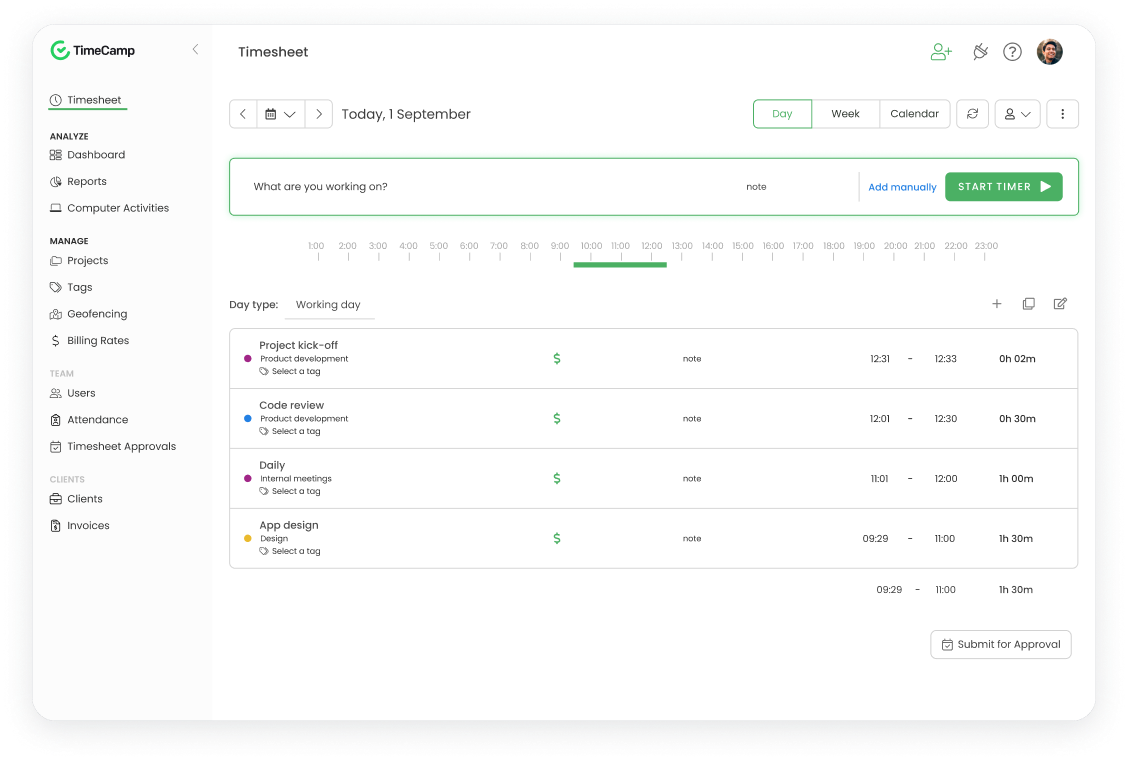
Yes. In TimeCamp, timesheets come with an approval module, giving managers complete control over submitted entries. Admins and previously designated supervisors can review and approve or reject their employees' timesheets directly in the system. Once approved, timesheets are locked to prevent further edits, ensuring data accuracy for payroll and billing purposes. Besides, TimeCamp also supports automatic email notifications to remind employees to submit their timesheets on time.

Approvals adjust to your team’s workflow – it can be set up daily or weekly.

Yes – both are built into TimeCamp so that you can bill and invoice clients within the system. First, establish custom billing rates per user or project, and TimeCamp seamlessly separates billable and non-billable hours.

An invoice can be created either based on tracked billable hours for a specific project or task or as a blank document. Once created, it can be exported to your accounting software for organized documentation. You can also check its status to see whether the payment is still pending or has already been processed.

Absolutely. TimeCamp offers a 14-day trial so that you can explore its core and premium features before purchase, no credit card required. Moreover, you can book a free demo with our team to get a personalized walkthrough tailored to your team’s workflow.

TimeCamp’s AI time tracking Agent, TIC, runs in the background and automates timesheet filling – no timers or manual entry is needed. Once permitted, it monitors your daily activity (such as apps, websites, document names, and your calendar) and seamlessly assigns time to the right projects.

TIC learns your workstyle and habits, continuously improving its service. It flags anomalies such as missing or misassigned entries and delivers comprehensive productivity insights. Moreover, it ensures no billable hours remain unlogged.

Our AI features run on your infrastructure, ensuring a privacy-first experience. The app is available for Windows and MacOS.

A time tracker is an online or offline tool that records how much time you and your team usually spend on projects and tasks, or for a particular client. It successfully replaces manual, guesswork-based spreadsheets with accurate, real-time data.

TimeCamp, one of the leading time trackers, offers multiple ways to track time within one tool: a one-click timer, manual entry, a desktop app for tracking user activity, or an AI Agent to track hours automatically in the background.

Tracked work hours are seamlessly organized and can be used for various purposes, such as reporting with productivity insights, client billing and invoicing, attendance tracking, and more.

TimeCamp! With its most generous free tier on the market, the one that includes unlimited users, projects, and free access to the core time tracking features, your entire team can track time from day one, even when the budget is tight.

Once you gain more financial stability, you subscribe to one of our paid plans. Use the free 14-day trial to try out our premium features before purchase.

Yes. Besides apps and plugins, TimeCamp works directly in your web browser – just sign up for a free account or log in to app.timecamp.com and start tracking. No downloads or installations required, just start a timer and enjoy!

A timesheet is a record of your hours worked, usually filled out manually at the end of the day or week. A time tracker, on the other hand, is a tool that seamlessly captures those hours in real time, so there’s no need for guesswork anymore.

TimeCamp ensures both, and they work in perfect sync.

Yes! TimeCamp allows you to create multiple projects and tasks, so you can easily handle as many clients and work as you need. Switching between tasks takes just a click, and our AI Agent does it seamlessly, requiring only your revision at the end of the day.

TimeCamp is the first time tracker with a built-in AI Agent that runs in the background and does all time and activity tracking for you. While other tools still rely on manual entries, TimeCamp’s TIC (Time Intelligence Center) eliminates end-of-day guesswork by automatically filling in your timesheets and learning your work style from your everyday activities.

No other time tracker offers this level of autonomy – with its zero-click approach, TimeCamp reduces admin headaches and ensures all billable hours are captured without any manual effort.

Yes. And TimeCamp makes it easy!

If you’re coming from Toggl, there’s a built-in migration tool that automatically imports your entire structure with just one click. For any other tool, use the TimeCamp API to transfer historical data.

Yes! TimeCamp apps work in offline mode, so if you lose internet connection or need a deeper, distraction-free focus session, they keep tracking in the background. Once you’re back online, your data syncs automatically.

No. TimeCamp focuses on how long you work on tasks, not on watching what’s on your screen. TimeCamp does not log keystrokes, and taking screenshots is optional; it only works when the account administrator launches the feature. The same goes for activity tracking – it’s optional, yet mandatory for categorizing time entries to the right projects. Admins have complete control over screenshots and computer activity tracking and can turn these features off.

Start with what matters the most for your team. The main factors should be ease of adoption, the highest level of data accuracy, and minimal friction. Besides, does it integrate directly into your current toolset? Can it scale along with your team’s growth? Does it offer multiple ways to track time and adjust to your team’s workflow?

Luckily, TimeCamp checks all of the above: free plan and free 14-day trial to check out all its premium features risk-free, scalability with unlimited users, plus an AI Agent, the first-time zero-click approach to time tracking. Give it a try! No credit card required.

A good time tracker tool helps your team understand how you spend time across projects so that you can optimize resource planning, bill customers accurately, and improve productivity. And with a well-packed, AI-powered automatic time tracker like TimeCamp, risky manual input based on guesswork will no longer lead to revenue leakage.

Yes! You can download TimeCamp’s desktop app for Windows, Mac, and even Linux. Choose between a standard app that (optionally) tracks computer activities or our AI Agent that seamlessly assigns time to the right projects, learns your workflow, and helps you fill timesheets in the background.

Absolutely. A time tracker not only registers your time, but also provides you with a detailed overview of where it goes, anytime you need it. Regular updates on how you spend your time have been shown to improve productivity, making you more aware of unproductive habits and more willing to improve your performance.

With an AI-powered time tracker like TimeCamp, work hours are tracked and assigned to the right projects in the background, allowing you to focus better on your assignments. Besides, the AI Agent diligently reports app and website usage, making it easier to spot productivity patterns and take action based on real data.

With TimeCamp, you have three ways to track hours worked: start a timer with just one click, enter hours manually, or enable the AI Time Tracker, which runs seamlessly in the background and automatically assigns time to the right project. All three ways + mobile apps and plugins sync perfectly, so tracked hours immediately appear in your timesheets, ready for reporting, billing, invoicing, or attendance.

Time trackers with automatic activity monitoring, like TimeCamp, run in the background and record the names of active application windows, websites, and documents you use throughout the day. Then, the tool automatically categorizes each activity as productive, unproductive, or neutral based on the previously set rules and shows you a detailed breakdown of how much time has been logged for each activity. Managers can see these reports team-wide.

The other way is our AI Agent, which creates detailed breakdowns of your activity based on screenshots visible only to you.