




TimeCamp logo

How DEWIZA Audyt stopped waiting three weeks to find out where the hours went

Managing a 30-person team in Excel files, with everyone involved in different projects, became a hassle. TimeCamp's timesheet & resource planner fixed it by bringing the team into one clear view that visualizes workload and shows current capacity.

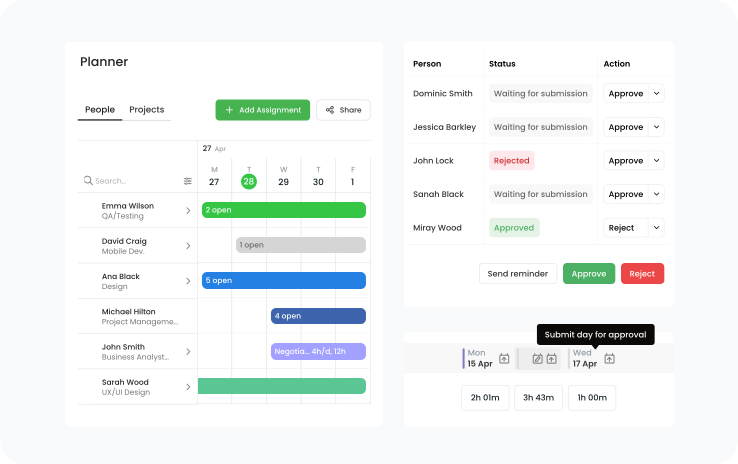
TimeCamp Resource Planner with weekly hour allocations per person and project
DEWIZA Audyt

Who DEWIZA Audyt is

DEWIZA Audyt is an audit firm with more than 10 years of experience in statutory audits. Operating across Poland and collaborating with experts from various other fields, they provide comprehensive financial statement reviews, tax audits, accounting advisory services, and more. They make sure every service is tailored to each client's unique needs and allocate services and consultants accordingly.

  • Industry: Audit and assurance

  • Employees: 20-49

  • Location: Gliwice, Poland

  • Using TimeCamp: For time tracking and resource planning

Most-used features

  • Resource Planner
  • Timesheets with approvals
  • Time and budget reports

Know who's available for your next project

Ready to switch from endless Excel spreadsheets to one source of planning truth?

Results with TimeCamp

  • DEWIZA Audyt

    Rafał Rydzak

    VP, DEWIZA Audyt

    “With 30 people on board and so many great clients, allocating resources in Excel simply became not worth the effort. The Planner view gave us what we needed – seeing every project with employees allocated to it in one place.”

The planning problem DEWIZA couldn't solve in a spreadsheet

30 people and 30 different Excel files. A weekly manual resource-to-project allocation became too much. The team was big enough to cover current workload – the problem was in how the workforce management was handled.

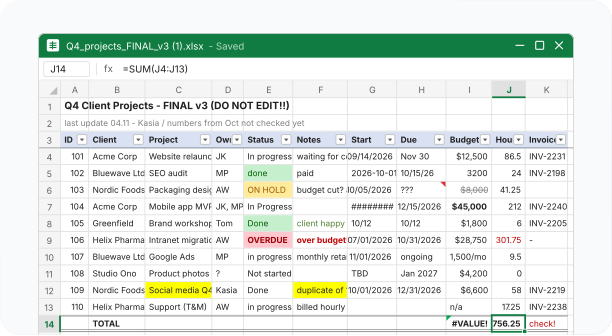
Excel planning matrix with team members assigned to client engagements week by week

A planning grid that broke with every change

A planning matrix, packed with different kinds of information, worked fine as long as no unplanned changes were made. For example, moving an engagement by a month meant going through that week and shifting the entry for every person on it, and a team covering two clients at once left two names in one cell that could no longer be filtered. Maintaining the grid had become a hassle.

Dozens of separate Excel timesheet files

30 files and three weeks of admin

A pile of separate files only grew. Everyone kept separate timesheets, named projects at their whim, printed a monthly summary, and sent it to payroll. Each Excel review, compiling data, clearing errors, and producing management outputs took usually around three weeks of admin time. The management team kept another file for settlement, checking the hours on a contractor's invoice against what the record showed. None of the files connected, so manually comparing the plans against actual hours to maintain accuracy was time-consuming.

What changed after the switch

Before TimeCampAfter TimeCamp
Each person kept their own Excel timesheet, project names typed freehandProject names set centrally, so allocation and reporting use one name
An admin colleague consolidated around 30 files after month end, up to three weeksThe system collects the hours itself, available as the month runs
Planning matrix of surnames by week, one client name per cellAllocation per person per week, in hours, several people visible on one engagement
Two clients in one week meant two names in one cell and no usable filterTwo clients in one week split by hours, each visible separately
A client's date shift had to be moved by hand across every affected rowAllocation moved in the planner, with the change visible to the team
Planned versus actual hours matched manuallyPlanned hours and submitted hours read from the same record
Excel accepted any number of hours, so over-allocation against a client fee surfaced lateHours checked against the client budget before the engagement runs over
Before TimeCamp
Each person kept their own Excel timesheet, project names typed freehand
An admin colleague consolidated around 30 files after month end, up to three weeks
Planning matrix of surnames by week, one client name per cell
Two clients in one week meant two names in one cell and no usable filter
A client's date shift had to be moved by hand across every affected row
Planned versus actual hours matched manually
Excel accepted any number of hours, so over-allocation against a client fee surfaced late
After TimeCamp
Project names set centrally, so allocation and reporting use one name
The system collects the hours itself, available as the month runs
Allocation per person per week, in hours, several people visible on one engagement
Two clients in one week split by hours, each visible separately
Allocation moved in the planner, with the change visible to the team
Planned hours and submitted hours read from the same record
Hours checked against the client budget before the engagement runs over
  • “Excel accepts anything. TimeCamp shows you if it adds up.”

    Rafał Rydzak

    VP, DEWIZA Audyt

How TimeCamp made planned hours checkable against the actual ones

Moving the Excel data to Resource Planner connected all the employees to a single source of truth. Project names are set centrally and shared across resource planning and reporting; resources are allocated in hours rather than entire weeks; and when two clients are scheduled for the same week, each client's allocation stays visible on its own.

No more loose timesheets; now they go to an approver each week, and managers can check who worked on what and whether anything unplanned happened. Settling with contractors also uses the same records, so hours billed on invoices are checked against them rather than compared with the sheets. As Dariusz Głąb, VP, says, now it’s “real work hours, not guesswork.”

TimeCamp Resource Planner, approved weekly timesheets, and a client budget report

What DEWIZA gained

  • Allocation and hours in one record, with no spreadsheet consolidation after month-end
  • One project name used by allocation, timesheets, and reports
  • Weekly timesheets, approved by one person
  • Contractor hours checked against real hours, in one tool
  • Hours against a client fee visible before an engagement runs over
  • Client budget tracking and invoice marking, with margin reporting next
  • No overbooked or understaffed projects in Planner

See who's assigned to what, each week

Follow DEWIZA's example – switch from messy Excel files to one tool for tracking and planning. Sign up for a free 14-day trial or just schedule a call with us to see TimeCamp with your numbers.

or sign up with:

14 days for freeNo credit card required

user reviews
4.7
user reviews
4.7
user reviews
4.7
  • Capterra Shortlist 2025
  • GetApp Category Leaders 2025
  • Software Advice FrontRunners 2025
  • G2 Highest User Adoption, Mid-Market, Fall 2026
  • G2 High Performer, Mid-Market, Fall 2026
  • G2 Leader, Fall 2026
  • G2 Regional Leader, Europe, Fall 2026