




TimeCamp logo

Employee monitoring and tracking software for productivity and performance

Boost your team’s productivity with TimeCamp’s all-in-one employee monitoring software. Monitor work hours, activity levels, and application usage effortlessly, ensuring efficient use of company resources—whether your team works remotely, in-office, or in a hybrid setup.

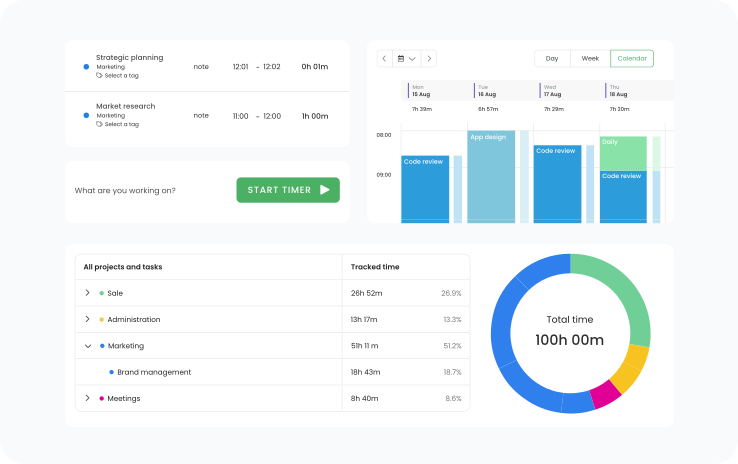
Timesheet entries and a timer next to a weekly calendar, above tracked time per project with a total time chart

Trusted by 18,000+ teams

TimeCamp in numbers

Companies using TimeCamp’s employee monitoring software report an average 15.82% increase in productive hours, helping teams work smarter, not harder.

Use case: time tracking for remote work

Everything you need for employee monitoring

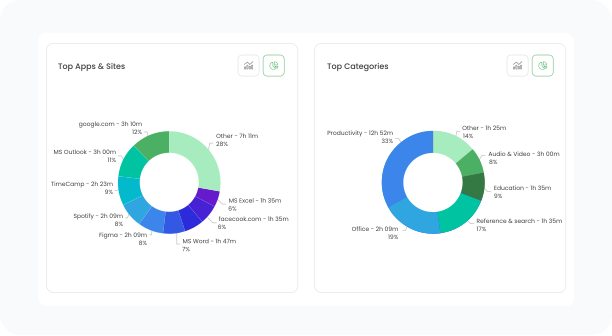
Donut charts of top apps and sites and top categories by time spent

Real-time employee monitoring tool

Gain real-time insights into employee activities with TimeCamp’s powerful monitoring tools. Track app and website usage, working hours, and overall productivity trends to ensure accountability across your workforce.

This functionality provides managers with an up-to-date view of team performance, helping to identify bottlenecks and ensure that resources are allocated efficiently. By offering instant visibility, TimeCamp empowers organisations to maintain high levels of transparency and optimise productivity.
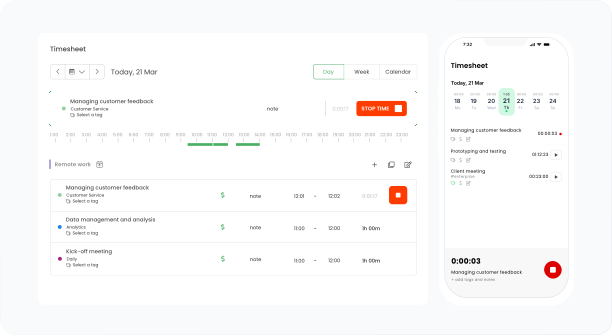
Web timesheet with a running timer next to the same timesheet in the mobile app

A versatile employee monitoring app

TimeCamp’s employee monitoring app is designed to work seamlessly across multiple platforms, including desktops and mobile devices, enabling comprehensive tracking of productivity.

This flexibility allows businesses to monitor activities across diverse working environments, ensuring consistent oversight whether employees are in-office, remote, or on the go. By consolidating data from various sources, the app provides a holistic view of employee performance, supporting better decision-making and fostering accountability.

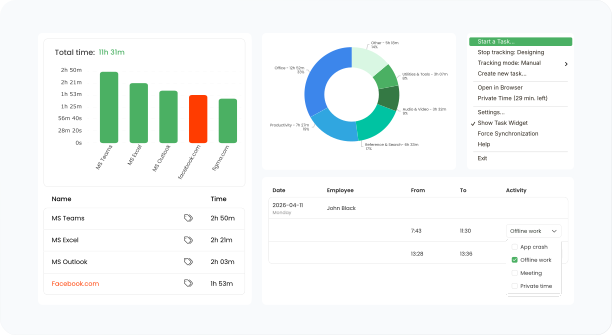
Time per app chart, a category donut chart, the desktop app menu and an away time entry marked as offline work

Remote employee monitoring software

Effectively manage distributed teams with TimeCamp’s remote employee monitoring software. This hassle-free tool offers clear insights into how remote employees spend their time, enabling managers to track activities, monitor progress, and ensure sustained engagement across geographically dispersed teams.

TimeCamp also supports flexible work arrangements and fosters trust between employees and employers by providing transparency in tracking methods. Employees can feel assured that their efforts are recognised, while managers gain a clear understanding of productivity patterns.

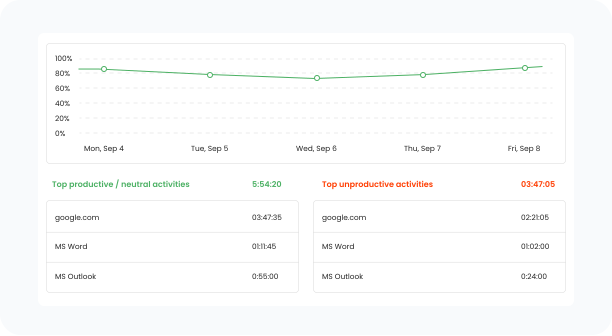
Daily productivity chart for a week above lists of top productive and unproductive activities

Detailed employee monitoring reports

TimeCamp’s employee monitoring system generates in-depth productivity reports to help organisations analyse work patterns and identify inefficiencies.

With over 20 types of reports, including pivot tables for custom insights, TimeCamp makes it easy to focus on the metrics that matter most to your business. Reports can be exported in multiple formats, such as PDF, Excel, and CSV, allowing for seamless integration with other tools. These features empower managers to address performance gaps, refine workflows, and maintain a data-driven approach to improving team efficiency.

One time tracking software, multiple ways to boost profitability.

Sign up for a free TimeCamp account – no credit card required.

or sign up with:

14 days for freeNo credit card required

user reviews
4.7
user reviews
4.7
user reviews
4.7

How to set up

How to get started with TimeCamp’s employee monitoring tool

  1. 01

    Create an account

    Sign up for TimeCamp or log in using your Google account.

  2. 02

    Install the app

    Download and install TimeCamp on employee devices.

  3. 03

    Set monitoring preferences

    Customize monitoring settings to match your company’s policies.

  4. 04

    Analyze reports

    Use reports to gain insights into employee performance and optimize workflows.

Convenient access to the employee monitoring system

Discover more than just an employee monitoring tool.

Explore other features to streamline your workflows.

or sign up with:

14 days for freeNo credit card required

user reviews
4.7
user reviews
4.7
user reviews
4.7
  • Capterra Shortlist 2025
  • GetApp Category Leaders 2025
  • Software Advice FrontRunners 2025
  • G2 Highest User Adoption, Mid-Market, Fall 2026
  • G2 High Performer, Mid-Market, Fall 2026
  • G2 Leader, Fall 2026
  • G2 Regional Leader, Europe, Fall 2026

Frequently Asked Questions

How to implement ethical employee monitoring that respects team privacy?

Ethical employee monitoring starts with clear rules, visible data, and a business purpose employees understand. TimeCamp helps teams review working hours, activity levels, and application usage, but the process should focus on project visibility, budget accuracy, and fair workload management. Employees need to know what is collected, why it matters, who can access it, and how it supports billing, staffing, and client delivery.

In what way does transparent productivity data help managers recognize consistent contributions?

Transparent workforce data can support better recognition when it is read alongside quality, delivery outcomes, and project context. TimeCamp reports help managers see consistent contribution patterns, billable work, task involvement, and activity trends across projects. This gives leaders stronger evidence for bonuses, promotions, or development conversations, without reducing performance to raw hours alone.

How should managers analyze workload patterns to identify signs of sustained team pressure?

Activity data can help managers spot workload patterns that suggest sustained pressure before performance drops. Long hours, limited breaks, frequent context switching, and heavy after-hours work give HR and team leads a reason to check capacity, deadlines, and staffing. TimeCamp reports should guide supportive conversations about workload distribution, not punitive reactions to individual work habits.

Does employee monitoring software provide the objective data needed for performance reviews?

Monitoring software gives performance reviews a stronger factual base by showing work patterns, project involvement, billable activity, and progress against assigned tasks. TimeCamp reports reduce dependence on memory, impressions, or incomplete status updates. Managers still need context, feedback, and delivery quality, but time and activity data make the review process more consistent and better grounded in evidence.

How to build a culture of accountability without using intrusive surveillance?

Accountability grows when employees can see and correct their own work records before managers need to intervene. TimeCamp gives teams structured logs, project assignments, and activity reports that make time usage easier to understand. Employees take ownership of their entries, while managers focus on budgets, delivery risk, and resource planning instead of constant follow-up.

Can monitoring tools help in justifying the need for additional resources?

Workforce visibility tools can justify hiring or contractor support when they show sustained capacity pressure across projects. TimeCamp reports help agencies compare available hours, billable load, internal work, and delivery commitments. If data shows that teams are consistently operating above a healthy workload level, stakeholders get a clearer case for additional resources to protect deadlines, client quality, and project margin.