Employee productivity monitoring software

Effectively manage overtime hours and extra work with TimeCamp’s overtime management system. Ensure accurate tracking, simplify project overtime calculations, and maintain compliance with your company’s policies using our overtime management software.
top image

Crafted locally, trusted globally

TimeCamp in numbers

Companies using TimeCamp for productivity monitoring report an average 15.82% increase in productive hours, helping teams work smarter, not harder.

button play video

Key productivity drivers monitoring

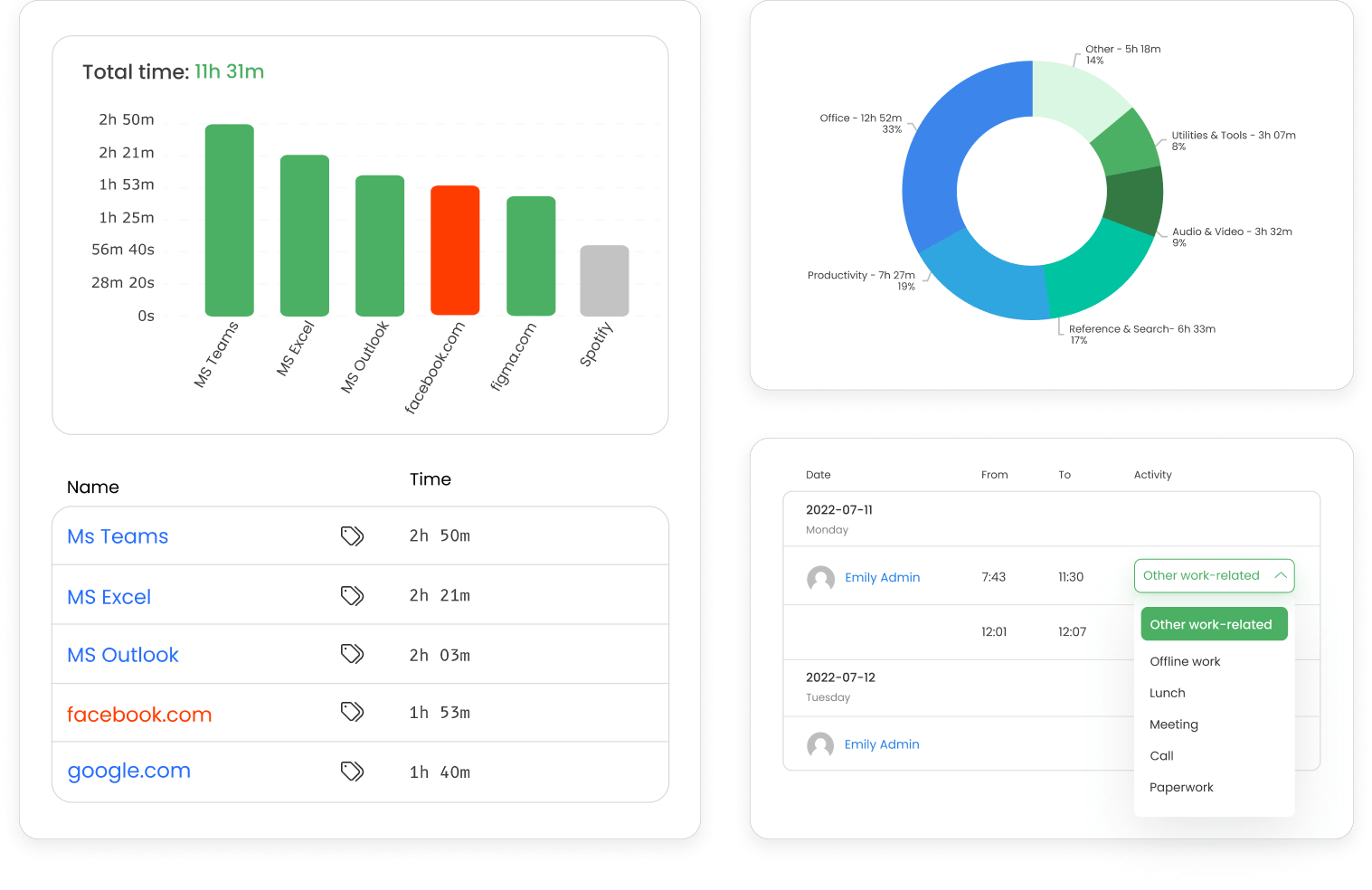
TimeCamp helps managers and team leaders understand where the focus lies, allowing for more strategic allocation of time and resources to maximize productivity.

Go beyond simple time tracking to understand what drives productivity in your organization. Pinpoint which tools, applications, and activities contribute most to your team's success, and identify potential distractions or time drains that can be minimized.

features
features

Productivity monitoring with customizable goals

Set specific productivity goals tailored to your business needs and track progress using TimeCamp’s advanced monitoring tools. Create benchmarks and use automated tracking to measure how well your team meets these targets.

This functionality allows you to visualize improvements over time and provides tangible data to help in coaching employees, improving workflow efficiency, and setting realistic future goals.

Employee monitoring and productivity insights

TimeCamp’s productivity monitoring includes reports with information about productivity levels and deviations from expected norms. Catch potential issues early—whether it's an employee struggling to meet their goals or a team facing unexpected obstacles.

By identifying signals of unproductivity early, managers can step in with the necessary support or adjustments, keeping projects on track and reducing the risk of delays or inefficiencies.

features
features

Focus time analysis for user productivity monitoring

TimeCamp identifies when your employees are most productive, helping you determine optimal work patterns for individuals and teams. Use this data to establish work schedules that align with each employee's peak performance times, ultimately leading to better outcomes and a more engaged workforce.

Enhanced analysis supports better work-life balance and ensures that employees can perform at their best without feeling overwhelmed or burnt out.

timecamp img

One time tracking software, multiple ways to boost profitability.

Sign up for a free TimeCamp account – no credit card required.

How to set up

Start using TimeCamp’s productivity monitoring tool

01

Create an account

Sign up for TimeCamp or log in using your Google account.

02

Install the app

Download and install TimeCamp on employee devices.

03

Set goals and preferences

Set productive activities and customize your goals to align with company policies.

04

Analyze data

Use insights and reports to optimize productivity and support your team.

Convenient access to TimeCamp productivity monitoring

timecamp img
badge
badge
badge
badge
badge
badge
badge
badge
badge
badge

Discover how TimeCamp can help boost your team's productivity.

Take your first step towards maximizing efficiency today.

Frequently Asked Questions

Productivity ROI becomes measurable when team output is compared with time allocation, project cost, and budget efficiency. TimeCamp reports can break work down by people, projects, categories, apps, and productivity trends, giving directors a clearer benchmark for different team structures. This helps evaluate whether cross-functional squads, specialist departments, or client-dedicated teams deliver stronger capacity usage and healthier margins.

Productivity trends can warn managers when delivery pace starts to weaken before deadlines are missed. TimeCamp shows work hours, task activity, app usage, project time, and productivity patterns, which help teams notice declining velocity, rising internal overhead, or uneven workload distribution. Managers can then adjust staffing, review priorities, or renegotiate timelines while there is still time to protect client delivery.

Objective productivity data helps balance workload by showing where capacity is concentrated and where it remains available. TimeCamp reports can compare team activity, project hours, app usage, and productivity categories across people or departments. This gives managers better evidence to reallocate assignments, reduce pressure on top performers, and assign new projects to employees with the right capacity and context.